
One agreed production workflow, typically delivered in about 30 days once scope and access are confirmed. Tyon configures the mix named in the scope. Reading and drafting can be automatic. Sending, paying, or writing to another system waits for approval unless the proposal explicitly authorizes that unattended action. Logging covers the actions that workflow records. See the implementation approach.
Workflow automation beyond Q&A
Custom agents classify requests, check business rules, update systems, and trigger approval workflows — from first intake to logged, reviewable action.
Answer & guide
An employee asks “How many vacation days do I have?” The chatbot reads your HR handbook, gives the answer, and offers to open a leave request — all in one chat.
Connect & update systems
When someone confirms a booking or approves a form, the chatbot can update your calendar, ticketing tool, or spreadsheet automatically — no copy-paste between apps.
Hand off when needed
Complex or sensitive cases go to the right person with full context. Your team sees what was already discussed, so nobody repeats themselves.
One agreed production workflow, typically delivered in about 30 days once scope and access are confirmed. The point of the workflow is to replace a chain of emails, forms, and manual handoffs with the steps in the proposal. Success measures are defined against your baseline. They are not promised percentages.
How to evaluate a custom AI workflow
Use the same buying criteria for a Tyon workflow and for any chatbot product.
| What to check | In a Tyon production workflow | What to ask of any chatbot product |
|---|---|---|
| Sources | Retrieval from the sources named in the scope. Citations when the design includes them. A tested fallback when a source is missing, old, or unclear. | Which sources does it use, and what happens when they are stale or missing? |
| Actions | Reading and drafting can be automatic. Sending, paying, or writing to another system waits for approval unless that unattended action is explicitly in the proposal. | Which actions run unattended, and who approves the rest? |
| Access and logging | Access rules and logs for the actions in that workflow. Not a certification, and not identical on every project. | What is logged, and which controls are optional add-ons? |
| Deployment | The environment named in the proposal. Private or on-prem deployment is optional and scoped separately. | Where does the data sit, and is private deployment a separate product? |
| Timeline | One agreed production workflow, typically about 30 days once scope and access are confirmed. | When does the clock start, and is discovery inside that period? |
Tools, skills & integrations
Three building blocks that turn a knowledge assistant into an agent that can act inside your systems.
Tools — things the chatbot can do
Tools are actions your chatbot can take: search the web, look up a document, send an email, create a calendar event, or run a calculation.
You pick the tools that match your process — like giving an assistant access to specific apps. Each tool has a clear purpose your team can understand at a glance.
Skills — how the chatbot should behave
Skills are instructions that shape personality and expertise: “You are an HR assistant,” “Always cite the employee handbook,” or “Be concise and friendly.”
Skills let you create specialized assistants for different departments — onboarding, IT support, sales — without building separate products.
MCP servers — plug into your software
MCP servers (Model Context Protocol) are secure connectors that let the chatbot talk to your existing business systems — CRM, help desk, Google Drive, databases, and more.
Think of them as standardized power outlets: one standard way to connect many tools, so your chatbot stays up to date as your stack grows.
Together: Skills define who the assistant is. Tools define what it can do. MCP servers define where it gets data and sends results. Tyon lets you mix and match all three — so a manager in HR and an employee in support can each get the right assistant without IT rebuilding everything from scratch.
Platform capabilities for production AI agents
RAG, workflow orchestration, voice, white-label, and private deployment — configured for one production workflow after scope and access are confirmed.
RAG for grounded answers
Retrieve from the sources in scope, cite them when the design includes citations, and escalate when the material is missing or unclear. A support-queue version is AI agents for SaaS support.
Skill orchestration
Chain specialized skills into multi-step workflows such as a qualified client brief, a proposal draft, or a weekly client report. Reading and drafting can run on their own. A consequential update waits for approval unless the proposal explicitly authorizes that unattended action. When a legacy portal has no API, the scoped option is browser automation.
Voice & IVR support
Low-latency telephony with barge-in, SIP integration, and natural voice for call centers and phone support. See voice AI assistant development.
White-label branding
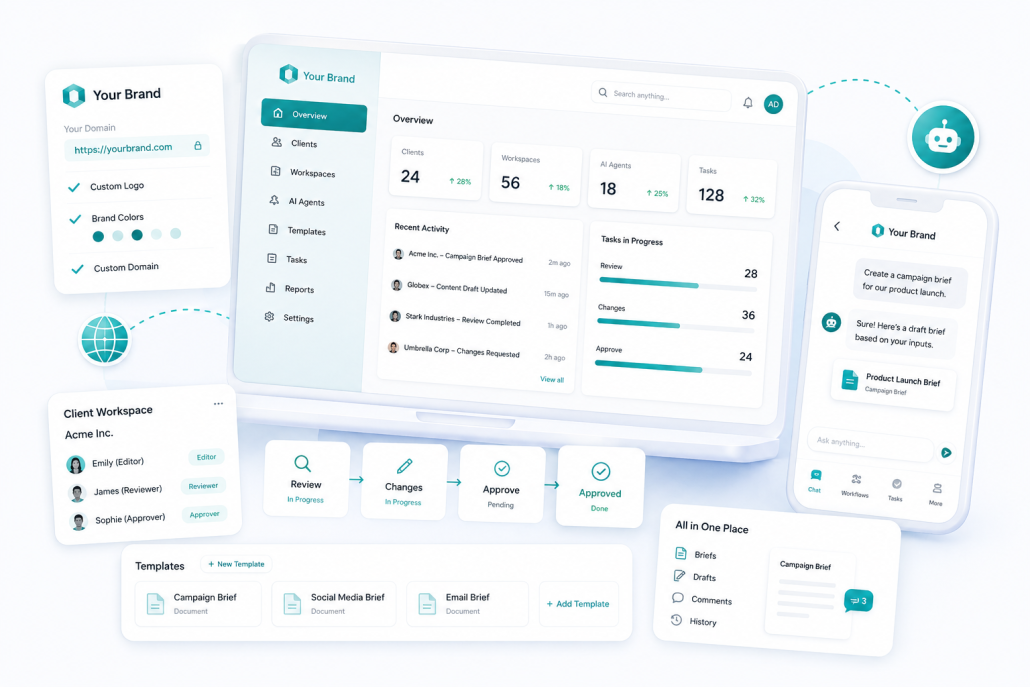
A separate agency offer: your logo, colors, domain, and client workspaces. Not included in a Production Implementation unless the proposal says so.
On-prem & private cloud
Private-cloud or on-premise deployment, with isolation and encryption, when that is the agreed setup. The data path is agreed and verified for the deployment, including the model, voice services, integrations, and other processing.
White-label AI agents your clients will trust
AGENCY & RESELLER READY
This block is a separate offer for agencies and resellers, not what a Production Implementation includes. It covers a branded chat, voice, workflow, and admin experience, plus a conversation about tenant management and reseller pricing. See white-label AI agents and Pricing.
-
Your logo, colors, and custom domain
-
Client workspaces with controlled access (reviewers vs editors)
-
Approvals as tasks: review → changes → approve, in stages
-
Reusable templates across clients and campaigns
-
Everything in one place: briefs, drafts, comments, and history
How these capabilities become one workflow
Tyon selects and configures the right mix of technology for one workflow — then delivers launch, handover, and your next automation roadmap.
1. Connect your data
Ingest knowledge bases, documents, FAQs, and event calendars. Tyon indexes content for RAG-powered retrieval.
2. Design skills & flows
Choose skills and tools that match your process — like onboarding checklists or IT ticket routing — and chain them into automated workflows.
3. Launch & hand over
Deploy to chat, voice, Slack, Teams, or internal tools — with audit logs, approval gates, team training, and a roadmap for the next workflow.
Model & API choices — without lock-in
Tyon can use more than one model provider. A later model change is a supported migration: it needs compatibility checks and testing, and it may require workflow updates.
Different teams prefer different AI brands. Some need an OpenAI model; others require Anthropic, Google, or an open-source option on their own servers. You choose the provider for the project, or use more than one where different tasks need it. Changing provider later is a supported migration and needs compatibility checks and testing before it goes live.
OpenAI
GPT family models for general conversation, reasoning, and tool use.
Anthropic
Claude models known for long documents and careful, helpful responses.
Google Gemini
Multimodal models from Google DeepMind for text, images, and search.
Meta Llama
Open models you can run on your own infrastructure for full control.
Microsoft Azure
Enterprise-grade OpenAI and other models inside your Azure tenant.
xAI Grok
Grok models with real-time information capabilities.
Mistral AI
Efficient European models for speed and cost-sensitive workloads.
DeepSeek & more
Additional providers and open-weight models as the AI landscape evolves.
Your agent configuration — skills, tools, workflows, approvals, and audit rules — stays the same when you change models. That protects your implementation investment as better AI becomes available.
Tyon is model- and provider-agnostic. Third-party AI services are subject to their own terms and privacy policies.
All product names, logos, and brands are property of their respective owners. OpenAI, ChatGPT, Anthropic, Claude, Google, Gemini, Meta, Llama, Microsoft, Azure, xAI, Grok, Mistral AI, and DeepSeek are trademarks of their respective companies. Use of these names does not imply endorsement, sponsorship, or affiliation with Tyon.ai.
Your data stays yours
Privacy and control built in — especially important for HR, legal, and regulated industries.
Employees share sensitive information with HR and internal tools every day. Tyon is designed so you decide where conversations and documents live — not a single AI vendor.
- On-premise or private cloud — run the platform in the environment named in the scope. The data path, including the model, voice services, integrations, and other processing, is agreed and verified for that deployment
- Tenant isolation — separate workspaces for departments, clients, or business units
- Encryption & audit trails — track who accessed what, with controls designed to support customer security reviews
- Bring your own keys — connect to AI providers with your accounts and billing
- Grounded answers — the chatbot cites the approved documents in scope. If a source is missing or stale, it uses the tested fallback
What this means for non-technical teams:
You get the productivity of modern AI without handing employee records, customer data, or internal policies to an unknown third-party app. IT and compliance teams can review exactly which tools and data sources each chatbot can reach.
The provider is chosen per project, so a model can be hosted in a region or on your own servers when that is the agreed deployment. The data path, including the model, voice services, integrations, and other processing, is agreed and verified. A model on your servers does not by itself keep every step inside that boundary.
Bottom line: faster self-service for staff and customers, with guardrails your organization controls.
Why teams choose Tyon for AI agents
Improved customer service
Resolve FAQs and complex inquiries 24/7 with grounded answers and seamless handoff to humans when needed.
Data sovereignty
On-premise or private cloud when the scope says so. The data path is agreed and verified for that deployment, including the model, voice services, integrations, and other processing.
Security-conscious architecture
Access controls, approval gates, audit logs, tenant isolation, and private deployment options. Final compliance depends on your configuration, policies, infrastructure, and legal requirements.
One production workflow
One agreed production workflow, typically delivered in about 30 days once scope and access are confirmed. Handover covers the workflow in the proposal.
Workflow automation
Chain skills into processes such as registration, ticketing, and scheduling. Steps that send, pay, or write to another system wait for approval unless the proposal explicitly authorizes them.
Languages agreed and tested
Chat and voice use the languages agreed and tested for the project. What is available depends on the provider and the channel.
Built for focused implementation
DAYS AFTER SCOPE
Agreed and tested
LANGUAGES
SKILL COMBINATIONS